WebNotification
WebNotification
Feature in FlowStart is used to display browser-based notifications to the user performing actions on the form.
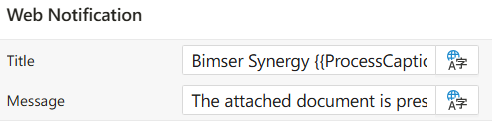
Title: Title of the notification that is shown to the user when the flow starts.
Example: Bimser Synergy {{ProcessCaption}}
Message: Custom message shown in the notification.
Example: The attached document has been presented for your information
This section enables sending push-style notifications to users upon triggering the flow.
Multi-Language Support Dialog
This dialog allows users to define language-based values for UI languages supported across the platform.
Multi-Language Support Dialog
When multi-language support is enabled for a field (such as project title or label text), a translation icon appears next to it. Clicking this icon opens the Multi-Language Support dialog, where users can enter localized values for different languages.
Interface Components
Language List: Displays all languages supported by the platform (e.g., English, Azerbaijani, Russian).Input Fields: Next to each language label, there are input boxes where translations can be entered.
How It Works
- The dialog lists all active languages configured in the system.
- Users can enter translations separately for each language.
- Empty fields fall back to the default language value in the UI.
- Entered values are saved as a dictionary (key = language code, value = translation).
Language codes follow the standard ISO 639 format (e.g.,
en,az,ru).
Usage Example
- When defining a
project titlein Synergy IDE:- Click the translation icon next to the title field.
- Enter values for each language as needed.
- Save and close the dialog.
Benefits
- Ensures a consistent multilingual user interface.
- Helps fulfill localization requirements in global environments.